This is my working list.
http://www.bio-itworld.com/news/08/24/10/Hugh-Rienhoff-cops-candidate-gene-daughters-DNA.html
west nile virus
arsenic apple juice
http://retractionwatch.wordpress.com/
metric, american science literacy. Students seem to prefer this one.
NSF survey on scientific literacy
parents age and health (SAT score), probably not a politically correct one.
Wednesday, February 6, 2013

Konita BizHub printer set up, 10.6+ osX
The Konita Bizhub 601 diver can be found at:
http://onyxftp.mykonicaminolta.com/download/SearchResults.aspx?productname=bizhub%20601
or
http://onyxftp.mykonicaminolta.com/download/SearchResults.aspx?productid=1138 (used by the IT rep)
For my Snow Leopard Laptop, I chose Mac OS 10.6.x - Drivers, and downloaded file ic208_ps_macX6_v122_efigs_ja_sc_tc_ko_inst.zip to my mac.
Unzip the downloaded files gave two folders: WW_Letter, and WW_A4. Each folder contains a file bizhub_751_106.pkg.zip. I chose WW_Letter, double-click the zipfile inside, and pkg file is generated. Double-click the pkg file, follow the prompt to install the driver. Administrator's password was asked during the installation process. Then a green circle with check appears, "installation was successful". I closed the installation window.
Go to Systems Preference, choose Print and Fax. Click "+", choose "IP",
Protocol: Line Printer Daemon-LPG,
Address: 172.17.18.36
Name: 172.17.18.36 Biology
Print Using: Konica Minolta 601 PS (This was chosen automatically after 1-2 seconds)

Then click "Add", I then chose for
Paper source unit: LU-405
Finisher: FS-524
Punch Z-fold Unit: None


Click "Add", and the printer appear in "Print and Fax"'s list of printers.

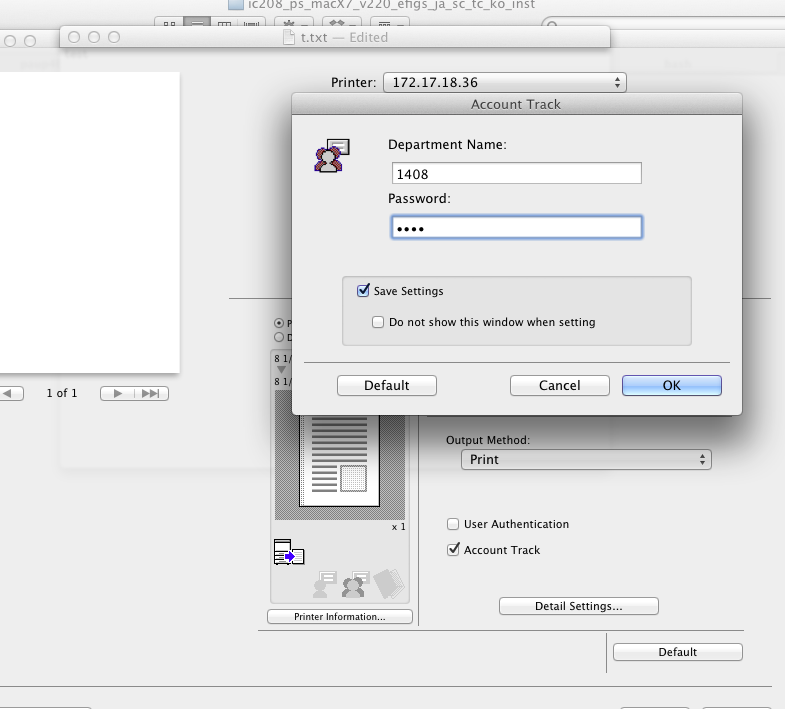
It turns the authentication is in print control.


Useful PAUP references
This is a working list.
http://paup.csit.fsu.edu/paupfaq/faq.html
http://peter.unmack.net/molecular/programs/paup.command.blocks.html
http://phylo.bio.ku.edu/slides/lab5ML/lab5ML.html
For maximum likelihood estimation, I see several ways to set it up in PAUP.
ML Analysis in PAUP by Peter Unmack
http://paup.csit.fsu.edu/paupfaq/faq.html
http://peter.unmack.net/molecular/programs/paup.command.blocks.html
http://phylo.bio.ku.edu/slides/lab5ML/lab5ML.html
For maximum likelihood estimation, I see several ways to set it up in PAUP.
ML Analysis in PAUP by Peter Unmack
[!
Likelihood settings from best-fit model (GTR+I+G) selected by AIC in Modeltest
3.7 on Tue Mar 13 23:03:48 2007]
begin paup;
set criterion=like;
set autoclose=yes;
set root = outgroup;
outgroup fish1 fish2 etc;
set storebrlens=yes;
set increase=auto;
log file=PeterML.log;
Lset Base=(0.2892 0.2928 0.1309) Nst=6
Rmat=(3.7285 46.5293 1.3888 2.3793 16.4374) Rates=gamma
Shape=0.9350 Pinvar=0.5691;
hsearch addseq=random nreps=5 swap=tbr;
savetrees file=datasetname.cb.ml.tree.nex format=altnex brlens=yes
maxdecimals=6;
end;
Monday, February 4, 2013
Time and Effort Report on Lotus Notes
On Lotus Note, follow the instructions below to create your Time and Effort Report:
It is unclear to me how different projects and programs are selected. I chose semester for myself. I did not see pop-up menu for sponsored programs.
- Access the Lotus Notes "Home" page;
- Select "Time Reporting" under the Category "options;"
- Select "Academic Affairs" under Applications, and click "Open Selected App;"
- Once the new page opens, highlight name and click "Create Time & Effort" (button located at top of page).
It is unclear to me how different projects and programs are selected. I chose semester for myself. I did not see pop-up menu for sponsored programs.
Friday, February 1, 2013
How to obtain SNP genotype data? (to be continued)
How to obtain SNP genotype data? (A work in progress)
From dbSNPI want to use either R or Python to analysis the dbSNP data for different populations. We are especially interested in the human clinic associated variants. ENsemble imports dbSNP data, and it shows clinic associated snps, frequency in different populations. An example is s1333049
FAQ for dbSNP offers some tips on downloading flat file. Some are related to my purpose here.
Q: I would like to use a script to fetch average allele frequency data for each human SNP from every web page, but I’m afraid that my IP will be blocked by the server for the heavy usage.
A: In general, large amounts of data can be obtained using our ftp, efetch or batch query services. Specifically, if you only need SNP allele frequency data, then use SNPAlleleFreq.bcp.gz, which is located on our ftp site. The Allele.bcp.gz file, also available on the ftp site, has Allele_id to allele_string mapping.
eFetch params for EntrezSNP:
# (id=NNNNNN[,NNNN,etc]) or (query_key=NNN, where NNN - number in the history, 0 - clipboard content for current database)
# db=snp (mandatory)
# report= (listed below)
A BioStar discussion on obtaining SNP information discussed UCSC, ensemble, and dbSNP. Apparently, different Python parsers are needed for SNP xmal data in comparison to other Entrez xml data. Some Python parser for SNP XML were discussed on BioStar.
From Ensemple,
A PERL example can be found at Biostar.
From Bioconductor,
Bioconductor provide some dnSNP build, as recent as build 137.
From UCSC MySQL
At UCSC website, a discussion on SNP suggests download the xml files from dbSNP. These files are what UCSC used to integrated dbSNP into their annotations. One user commented that dbSNP merged frequency reported by different labs and can lead to biases.
The help page is: http://genome.ucsc.edu/goldenPath/help/mysql.html
However, "Bot access and excessive program-driven use are not permitted" by UCSC.
mysql --user=genome --host=genome-mysql.cse.ucsc.edu -A -D hg18 -e 'select name,chrom,chromStart,chromEnd,observed from snp130 where name="rs35568883"'
+------------+-------+------------+----------+----------+
| name       | chrom | chromStart | chromEnd | observed |
+------------+-------+------------+----------+----------+
| rs35568883 | chr21 |   38782125 | 38782126 | A/G      |
+------------+-------+------------+----------+----------+
From 1000genome
FTP site: ftp://ftp.1000genomes.ebi.ac.uk/vol1/ftp/data http://www.1000genomes.org/data - https://cgsmd.isi.edu/dbsnpq/
- XML file for genotype data: ftp://ftp.ncbi.nlm.nih.gov/snp/organisms/human_9606/genotype/
- SNP Eutility, http://www.ncbi.nlm.nih.gov/SNP/SNPeutils.htm
http://www.1000genomes.org/datahttp://hapmap.ncbi.nlm.nih.gov/human disease databasehttp://www.genecards.org/cgi-bin/listdiseasecards.pl?type=full
Thursday, January 31, 2013
codeml on polymorphism data
Question: codeml on polymorphism data for selection?? treating polymorphism as divergence? Using codeml on multiple genome data is common. Is this an abuse of codeml?
Monday, January 28, 2013
Ridicicol dose ~ p change in NRMCA
ridicicol dose ~ 'p' change in NRMCA.
* Bolon hsp90 dose effect. ~ 'p' effect in NRMCA. with my paper.
S.E. Rigdon, A.P. Basu, The power law process: a model for the reliability of repairable systems, J Quality Technol, 21 (1989), pp.251–260
Thursday, January 24, 2013
Cilantro and genetics
Materials on cilantro and human genetics
References:
http://snpedia.com/index.php/Rs72921001
http://arxiv.org/abs/1209.2096
http://www.npr.org/blogs/thesalt/2012/09/14/161057954/love-to-hate-cilantro-its-in-your-genes-and-maybe-in-your-head
http://boingboing.net/2012/09/12/why-cilantro-haters-hate-cilan.html
http://www.nytimes.com/2010/04/14/dining/14curious.html?_r=0
http://nachosny.com/2010/04/cilantro-haters-have-a-new-excuse-genetics/
http://ihatecilantro.com/stories.php
http://ihatecilantro.com/images/burn2.jpg

Failed attempt to fix a mountain lion laptop that failed to start
Hold "alt-option" key when the laptop was starting, choose "the recovery disk".
Then choose Disk Utility to verify HDD. In this case, the HDD needs to be repaired.
Select "Macintosh HD" (750G), Click "repair Disk":
... ... (this took about 1 mintues)
... inncorrect number of thread records ...
.... (another 1 mintue)
repairing volume
"Disk Unitliy stopped repairing Macintosh HD". Backup as many files as possible, reformat the disk, and restore your backup files.
Choose my 'backup disk" (it is a backup disk from a different Mountain Lion laptop), drag "Macintosh HD" to "Destination", ..., click "Erase".
... ... 'copying blocks', estimated time 2 hours... ...
After 1.5 hours, restart computer, chose 'restore system from backup'. "Searching for disks" is gray and seem to be stuck.
18:43, Unpluged the external HD and restart the laptop, choose reinstall Mountain Lion osX. It shows that the harddisk is locked. I tried again, it said that installation information is not available.
Wednesday, January 23, 2013
Notes on Yang & dos Reis 2000 MBE branch-site model
Statistical Properties of the Branch-Site Test of Positive Selection, Ziheng Yang and Mario dos Rei, 2000, MBE
what is foreground w2 and background?
w2 in the foreground branch are often infinite and unreliable.
It is sometimesattemptedtousetheestimateofx2asameasure
of the strength of selection in the gene on the foreground
branch.As discussed by Bakewell et al. (2007) and Nozawaet al.
(2009a), point estimates of x2 produced by the codeml program
are often infinite and unreliable.
References
Nozawa M, Suzuki Y, Nei M. 2009a. Reliabilities of identifying
positive selection by the branch-site and the site-prediction
methods. Proc Natl Acad Sci U S A. 106:6700–6705.
Bakewell MA, Shi P, Zhang J. 2007. More genes underwent positive
selection in chimpanzee evolution than in human evolution.
Proc Natl Acad Sci U S A. 104:7489–7494.
Tuesday, January 22, 2013
For Spelman Faculty, How to access research resources & title III form
Based on the instructions that I received, the steps are
1. Go to Lotus Notes Dashboard
2. Click "Category": Document Libraries, and "Applications": Research Resources.

3. Click "Open selected app
4. Click "By category" on the left column

5. Select Research Resources Forms or Title III Forms
6. Click on the appropriate form

1. Go to Lotus Notes Dashboard
2. Click "Category": Document Libraries, and "Applications": Research Resources.
3. Click "Open selected app
4. Click "By category" on the left column
5. Select Research Resources Forms or Title III Forms
6. Click on the appropriate form
Wednesday, January 16, 2013
Use unison to synchronize directories between two apple computers
I have a mac server x.spelman.edu (Mountain Lion). I installed unison in /opt/local/bin/unison by download the mac GUI Universal Binary 2.27.72, tested on Leopard. (Later, I reinstalled to 2.32).
I then install the unison with GUI on my Snow Leopard laptop. I set up a small test directory /Users/hongqin/demo/unison/. I 'touched' a file 'hello.ace.txt' in this directory. On my snow leopard, I double-clicked the "U" icon, set up a profile:
Profile name: test ace->tower
First root: File: /Users/hongqin/demo/unison/
Second root: Remote, User: YYY, Host: x.spelman.edu
After save this profile, I "open" it. Password was asked for the remote server.
10:14, looking for changes, waiting for changes from server. This seems to be stuck.
$ unison -version # 2.32
$ ssh username@x.spelman.edu unison -version #2.27
OK, unison have different version on the two computers.
Reinstall 2.32 on the server side, but the /opt/local/bin/unison was not updated automatically. I have to manually cp a 2.32 unison to the server directory.
On 'ace'
$ unison demo/unison/ ssh://xx@xx.spelman.edu/demo/unison
This worked.
I then tried
$ unison projects ssh://xx@xx.spelman.edu/projects
During the run of unison, I tried to run a GUI version for another job, but the server did not respond. It seems there is only one instance of unison running on the server side. Not sure whether this is my configuration problem or just the way it is.
Updated on 2013 Feb 12:
The ssh method often drops when working on large number of files. Later, I mounted the remote disks locally, and run unison locally. This method seems more reliable than ssh.
The unison log file 'unison.log' is often located in user's home directory.
Note: 'unison' developer has stopped working on it. It is time for a new software tool.
Updated on June 24, 2015
https://en.wikipedia.org/wiki/Unison_(file_synchronizer)#Advice_on_using_Unison
https://en.wikipedia.org/wiki/Comparison_of_file_synchronization_software
I then install the unison with GUI on my Snow Leopard laptop. I set up a small test directory /Users/hongqin/demo/unison/. I 'touched' a file 'hello.ace.txt' in this directory. On my snow leopard, I double-clicked the "U" icon, set up a profile:
Profile name: test ace->tower
First root: File: /Users/hongqin/demo/unison/
Second root: Remote, User: YYY, Host: x.spelman.edu
After save this profile, I "open" it. Password was asked for the remote server.
10:14, looking for changes, waiting for changes from server. This seems to be stuck.
$ unison -version # 2.32
$ ssh username@x.spelman.edu unison -version #2.27
OK, unison have different version on the two computers.
Reinstall 2.32 on the server side, but the /opt/local/bin/unison was not updated automatically. I have to manually cp a 2.32 unison to the server directory.
On 'ace'
$ unison demo/unison/ ssh://xx@xx.spelman.edu/demo/unison
This worked.
I then tried
$ unison projects ssh://xx@xx.spelman.edu/projects
Updated on 2013 Feb 12:
The ssh method often drops when working on large number of files. Later, I mounted the remote disks locally, and run unison locally. This method seems more reliable than ssh.
The unison log file 'unison.log' is often located in user's home directory.
Note: 'unison' developer has stopped working on it. It is time for a new software tool.
Updated on June 24, 2015
https://en.wikipedia.org/wiki/Unison_(file_synchronizer)#Advice_on_using_Unison
https://en.wikipedia.org/wiki/Comparison_of_file_synchronization_software
Some common bugs in bioinformatics programming and lessons in dealing with them
Many ad hoc scripts are written for bioinformatics projects. I intend to list here some common bugs that I often made. This is going to be a working list. Hopefully, this can leads to better way of coding and managing.
case 1: qw(results.H0.txt results.H1C.Gblocks.model1.txt results.H2C1S1.txt);
case 2: qw(results.H0.txt, results.H1C.Gblocks.model1.txt, results.H2C1S1.txt);
In case 2, the file name will actually be treated as "results.H0.txt,". This extra comma is a obvious mistake.
- Hard-coded links that were not updated after projects have evolved. This often lead to wrong files, or results are output to unintended directories.
- A hard-coded debugging variable that was not turned back during production runs.
- Mixing of variables names, file names, etc.
- Compatibility problems. This can occur after software upgrades. For example, after upgrade to perl 5.10.0, I have re-install bioperl to get previous codes working.
- File format problems. With myriads of data format, this problem is going to keep bugging us.
- Typos
- logical mistakes, often occur in ifelse statement.
- Correct the blind spot.
- Switch between different syntax
case 1: qw(results.H0.txt results.H1C.Gblocks.model1.txt results.H2C1S1.txt);
case 2: qw(results.H0.txt, results.H1C.Gblocks.model1.txt, results.H2C1S1.txt);
In case 2, the file name will actually be treated as "results.H0.txt,". This extra comma is a obvious mistake.
Find out funding budget/department on Lotus Notes
At Lotus Note dash board, choose "Business & Financial Affairs", then choose "budget transfer", and "open selected App".
A new page will appear with all budgets. I found it convenient to choose "By Department", and then look for the specific fund/department.
A new page will appear with all budgets. I found it convenient to choose "By Department", and then look for the specific fund/department.
Subscribe to:
Posts (Atom)